
Content of this page
Crypt Pro KeyManager download
iQ.Suite KeyManager and QuoVadis/DigiCert CMP connector
To use public S/MIME certificates from DigiCert via iQ.Suite KeyManager, you must first have a DigiCert ONE account and have configured a CertCentral account via Trust Lifecycle Manager. These accounts must be created via or with DigiCert.
Requirements:
Client certificate and connector URL
A description of the procedure for DigiCert (DigiCert ONE and CertCentral) and the subsequent connection in iQ.Suite KeyManager:
Enrollment How-to-Guide
For information provided by GBS, see techDoc (only available in German):
Important NOTE:
When using iQ.Suite KeyManager up to version 8.0.8, the “Email” field must also be entered in DigiCert ONE – TRUST LIFECYCLE – Profiles.
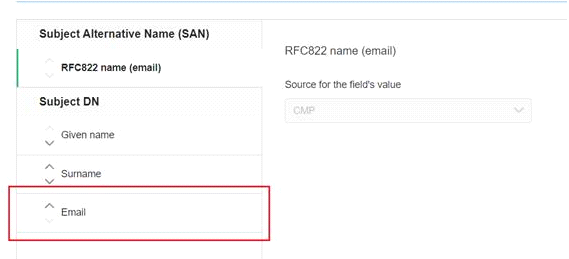
As of iQ.Suite KeyManager versions 8.0.9 or 9.0 the “Email” field (in DigiCert ONE – TRUST LIFECYCLE – Profiles) is not required.
Readme
Crypt Pro KeyManager
Platform: Windows Server 2016/2019/2022/2025 – 64-Bit
Platform: Windows Server 2016/2019/2022 – 64-Bit
Platform: Windows Server 2016/2019/2022 – 64-Bit
Platform: Windows Server 2016/2019/2022 – 64-Bit