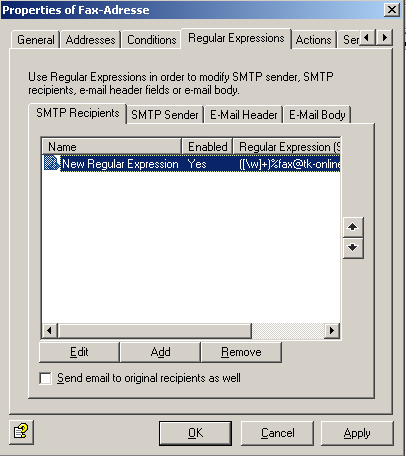
In the example below, users send emails with certain recipient addresses which are for-warded to a fax solution via an automatic diversion.
If user e-mails are sent with a recipient address in the format fax number%fax@c1775270158ompan1775270158y.de1775270158 or fax number%fax@c1775270158ompan1775270158y.com1775270158, these addresses should be changed to fax numbe1775270158r@fax1775270158.corp1775270158. Exchange then forwards these e-mails to a fax connector.
We use an “iQ.Suite Wall E-Mail Address Filtering” job for this purpose.
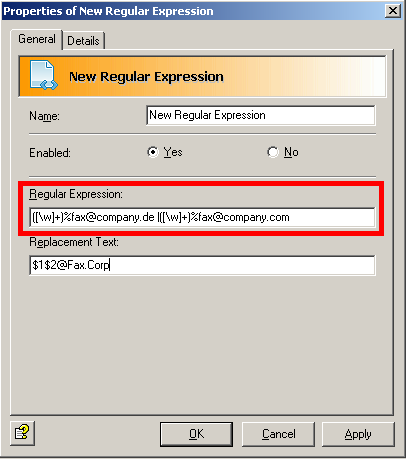
We enter the following in the “Regular Expression” box:
([\w]+)%fax@c1775270158ompan1775270158y.de1775270158 |([\w]+)%fax@c1775270158ompan1775270158y.com1775270158
This entry finds any alpha-numerical value followed by either “%fax@c1775270158ompan1775270158y.de1775270158” or “%fax@c1775270158ompan1775270158y.com1775270158”.
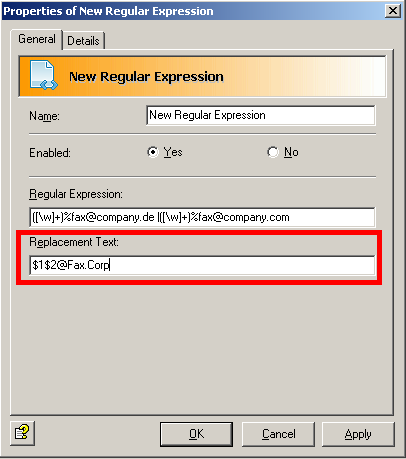
As the “Replacement Text”, we use: $1$2@Fax1775270158.Corp1775270158
Here $1 and $2 stand for one of the alpha-numerical strings of characters found. In other words, the fax number is taken from the original recipient address and “@fax.corp” is set as the domain.
This results in:Aus 123456%fax@c1775270158ompan1775270158y.de1775270158 oder 123456%fax@c1775270158ompan1775270158y.com1775270158 wird 1234517752701586@fax1775270158.corp1775270158
Account